

How to

Preparation
-
Open the adjustment buckle of the BOOSTER on the left side.
-
Open the size adjustment buckle on the right.
-
Lengthen the shoulder straps.
-
Remove the elastic holding band from the leg strap by pulling apart the Velcro clasp.
-
Open the buckles on the leg straps.
01
Put the BionicBack on like a backpack
-
Make the shoulder straps and waist strap long
-
Open all fasteners, including the support adjustment buckles
-
Pull the shoulder straps over your shoulders
-
Make sure that the BionicBack sits centrally on your back


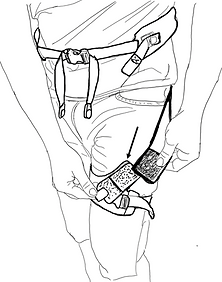

03
Close the leg straps
-
Make sure you have a good and comfortable fit
-
Close the buckles on the right and left
-
Put the Velcro of the glute gand in the Velcro of the leg strap. This is important so that the leg straps stay nicely in place.
-
The leg shells should be well tightened, but only tight enough to be comfortable for you.
02
Close the waist belt and set it comfortably
-
Make sure you have a loose fit
-
The waist belt can be worn loosely
-
You can also swap steps 02 and 03 in the order. Just as you prefer.


04
Adjust the fit of the BionicBack
Shorten or lengthen the shoulder straps
The BionicBack sits optimally in such a way that the arched shape is at the level of your lumbar vertebrae. More on this in the next picture.
05
Optimal fit
-
The BionicBack should sit nicely in the middle of your back
-
Not too low and not too high
-
It fits optimally when the waist belt is roughly at the level of your navel
-
If you have set the BionicBack a little loosely, then it actually slips into the right place by itself.


06
Size adjustment
-
Use the adjustment straps on your right side to adjust the optimal size and support. Then close the settings clasp.
-
Pull the strap so far that the "artificial muscles" lightly touch your buttocks. See next picture.
07
Size adjustment
-
Pull the adjustment strap out so that the artificial muscles are lightly against your buttocks.
-
You can vary this setting depending on your work. The closer these are, the greater the support of the muscles in the first support level.
-
You can change this setting at any time or switch it off. To do this, open the adjustment flap (black plastic part from which the belt comes) and move a little. The system then elongates itself again.


08
Test the support
-
Bend forward a little and test the feeling. A good fit is characterized by the fact that the BionicBack rests directly on the body.
-
If you bend your back too much, you will feel the pressure from the BionicBack in the area of the lumbar vertebrae. Try to push your pelvis back a little, then the pressure should be gone. This way you can do exercises for your back with the system from time to time and consciously try to feel your posture.
-
Try different settings again and again so that you get to know the different types of support and find your best setting.
-
Important: Make it feel good to you.
With this first setting you work optimally in:
-
Dynamic work
-
Deep bending and lifting tasks

09
BOOSTER setting
-
Try the BOOSTER. This dampens the whole system.
-
Depending on the setting, it can increase the support further or it cushions you from a certain position so that you can relax in static holding tasks.
Switching on the booster is particularly useful for:
-
Assembly areas
-
Static flexion postures
-
Long leaning tasks


Tips and Tricks
Before getting dressed
-
If the clasps of the BionicBack have been closed for storage, or the last wearer has not deactivated the support before taking it off, all claps should be opened and all straps lengthend. This makes it much easier to put on.
While donning:
-
It is advisable to close the leg straps before closing the waist strap.
After the user has slipped into the shoulder straps, it hangs down slightly on the body, making it easier to put on the leg straps. -
The position of the system on the wearer's back is very important for targeted application of force and comfortable use. Before the waist strap is tightened, the wearer should feel the position of the system in the lumbar region.
In use:
-
Due to the structure of the BionicBack, a symmetrical support for both legs is activated by pulling the right adjustment strap (size). The left adjustment strap (booster) can optionally be pulled if additional support is required for static work.
The further the left adjustment strap for the booster is pulled, the sooner its support takes effect. Often it is no longer possible to bend deeply or lift off the floor with the booster switched on. If this is necessary, the booster should be deactivated again or set at a weaker setting by opening the support buckle. -
The BionicBack is designed in such a way that it can cover most body sizes and circumferences. For some people, however, it makes sense to move the leg straps along the thigh in order to slightly change the support properties.
For smaller people, the leg straps can be moved a little further towards the knee. As a result, the system can elongate futher and can provide more support.
For bigger people, the support of the BionicBack can be slightly loosened by moving the leg shells slightly upwards. -
In the event that the length of the straps is insufficient for the thighs or abdomen, hTRIUS provides extensions that can simply be clicked into place. Just contact us for that.
When storing:
-
It is advisable to close the clasps of the BionicBack before storage.